Just need a calculator? Skip the comparison — use our free Position Size Calculator and get your lot size in seconds.
Most blown accounts aren't caused by picking the wrong direction. They're caused by picking the wrong size.
Wrong direction with a proper stop? You lose 2%, move on. Wrong position size with that same stop? You lose 20%. You thought you had a safety net. You did—it just had a hole in it.
Babypips' position sizing course hammers this point repeatedly: correct position sizing is the single most important defense against one trade destroying your account. We've seen the same thing firsthand at FXTool while helping users configure EA parameters—same strategy, same entries, same stops, but change risk from 2% to 5% per trade and the equity curve three months later tells a completely different story.
The formula itself fits on one line. But doing it by hand means looking up live exchange rates, converting to your account currency, figuring out whether gold is 100 ounces or 100,000 units per lot. After doing that a few times, you understand why calculators exist.
We tested every free position size calculator we could find in June 2026 and kept 5. On a standard EUR/USD scenario they all agreed. The differences show up in instrument coverage, account currency handling, and whether the tool actually respects your time.
The Position Sizing Formula (Understand It Before Picking a Tool)
One-line version:
Lot Size = Risk Amount ÷ (Stop Loss in Pips × Pip Value per Lot)
Three variables, one formula. Each variable has a trap.
Example 1: EUR/USD
Account: $10,000. Risk: 2%. Stop loss: 50 pips.
What does "2% risk" mean here? It means if this trade hits your stop, the maximum you lose is 2% of your account balance. 2% of $10,000 = $200.
The key insight—you don't decide the lot size first and then see how much you'd lose. You do it backwards: decide "I'm willing to lose $200 on this trade," then calculate the lot size that makes that true given your stop distance. That's what a position size calculator does.
- Risk amount = $10,000 × 2% = $200
- EUR/USD pip value per lot = $10 (for how pip values work, see our pip calculator article)
- Lot size = $200 ÷ (50 × $10) = 0.40 standard lots
So the answer is 0.40 lots—not 1 lot, not 0.1 lots. The number is entirely determined by your risk tolerance and stop distance. Same account, same risk, but a 25-pip stop? 0.80 lots. A 100-pip stop? 0.20 lots. Wider stops mean smaller positions, tighter stops mean bigger ones—so that no matter where your stop is, the dollar amount at risk stays the same: $200.
This is the simplest case—the quote currency is already USD, so no conversion needed.
Example 2: USD/JPY
Same account and risk. Stop loss: 50 pips.
- USD/JPY rate: 157.00
- Pip value per lot = 0.01 × 100,000 ÷ 157.00 = $6.37
- Lot size = $200 ÷ (50 × $6.37) = 0.63 standard lots
Notice: the exchange rate changed, so the pip value changed. USD/JPY moving from 150 to 165 shifts the calculated lot size by about 10% on the same stop distance. This is why you use live rates instead of memorizing a fixed number.
Example 3: XAU/USD (Gold)
Gold is where position sizing goes wrong most often.
Standard lot contract size is 100 troy ounces—not 100,000 units like forex. And brokers don't agree on what "one pip" means for gold. In forex, a pip is universally 0.0001 (or 0.01 for JPY pairs). Gold has no such standard. Brokers choose how many decimal places to quote: two decimals (2350.00) means 1 pip = $0.01, one decimal (2350.0) means 1 pip = $0.1, no decimals (2350) means 1 pip = $1.0. Different decimal places, same word "pip," 10x or 100x difference in what it represents.
Assume your broker defines 1 pip = $0.01, stop loss 500 pips (= $5.00 price move):
- Pip value per lot = $0.01 × 100 = $1
- Lot size = $200 ÷ (500 × $1) = 0.40 lots
Before using any calculator for gold, confirm your broker's pip definition. Getting this wrong isn't a rounding error—it's a 10x position size error.
For more on managing risk across different instruments, see our forex risk management guide. Once you've sized the position, the next step is checking whether the trade is worth taking—the risk-reward calculator helps with that.
5 Free Position Size Calculators: Tested and Compared
June 2026 testing. Method: EUR/USD, $10,000 account, 2% risk, 50-pip stop. Expected result: 0.40 lots. All five passed.
Listed alphabetically—not ranked.
1. Babypips Position Size Calculator
Babypips is where a lot of traders start, and this calculator fits right into that learning-first approach. Pick a pair, enter your risk, set your stop, get a lot size. The position sizing lessons sit right next to the tool—you learn the concept and apply it in the same place.
What's missing? No live exchange rates—it uses static prices. Coverage is limited to about 28 major pairs. No gold, no crypto, no indices. The interface looks dated. But honestly, if you're still figuring out what an EA is or how to run a backtest, the educational content surrounding the calculator matters more than the calculator itself.
Best for: Beginners who are still working through the question "how much should I risk per trade?"
2. Dukascopy Position Size Calculator
Dukascopy is a Swiss banking-licensed broker, and their calculator pulls live market data. Clean interface, no clutter. Enter your balance, risk percentage, stop loss, and instrument—get lot size.
Covers major and cross pairs plus precious metals. We ran a few USD/JPY calculations side by side with TradingView and the rates were within a fraction of a pip—no complaints on data quality. The tool is designed primarily for Dukascopy clients, so some features may be limited for non-clients. Has a partial Chinese UI. No ads.
Best for: Traders who care about data source quality and want bank-grade exchange rates.
3. EarnForex Position Size Calculator
EarnForex has been in the position sizing space longer than most. It's the most feature-complete web calculator on this list. Beyond the browser version, EarnForex also offers MT4/MT5 indicator versions—calculate your position directly on the chart without switching to a browser tab.
The web version covers 60+ forex pairs, including exotics like USD/TRY and EUR/ZAR. It supports pending order mode with a custom entry price. But web-based gold and silver support is limited—contract specs for metals vary too much between brokers, and EarnForex recommends their MT4/MT5 Position Sizer EA for commodities. That EA reads your broker's contract specifications directly, which eliminates the manual configuration problem entirely.
The tradeoff: the web page is information-dense. First-time users need a few minutes to sort out which fields are inputs and which are outputs. There are ads. But if you regularly trade USD/TRY or EUR/ZAR, very few other tools cover those pairs at all.
Best for: Exotic pair traders, or anyone who wants to calculate position size directly on their MT4/MT5 chart without opening a browser.
4. FXTool Position Size Calculator
Full disclosure: this is our own tool. We'll be as objective as we can.
FXTool Position Size Calculator covers 32 instruments—majors, crosses, gold, silver, BTC, and ETH. Exchange rates update daily via API. Supports 8 account currencies (USD/EUR/GBP/JPY/CHF/AUD/CAD/CNY), and results display simultaneously in standard lots, mini lots, and micro lots.
Bilingual interface—English and Chinese. That's uncommon for position size calculators. No ads, no registration required. The calculator is part of a 7-tool suite alongside the pip calculator, profit calculator, margin calculator, and risk-reward calculator—all interlinked. Calculate your position size, then jump straight to checking margin or evaluating risk-reward without opening a new site.
If you trade on MT5, we also built a chart panel. Enter your risk percentage and stop distance, and it calculates lot size and margin right on your chart—no browser tab needed. Pip value, position size, and margin in one panel. Free to download with a registered account. We built this because we kept seeing users calculate on the web, then manually type the numbers into MT5. That's where transcription errors happen.
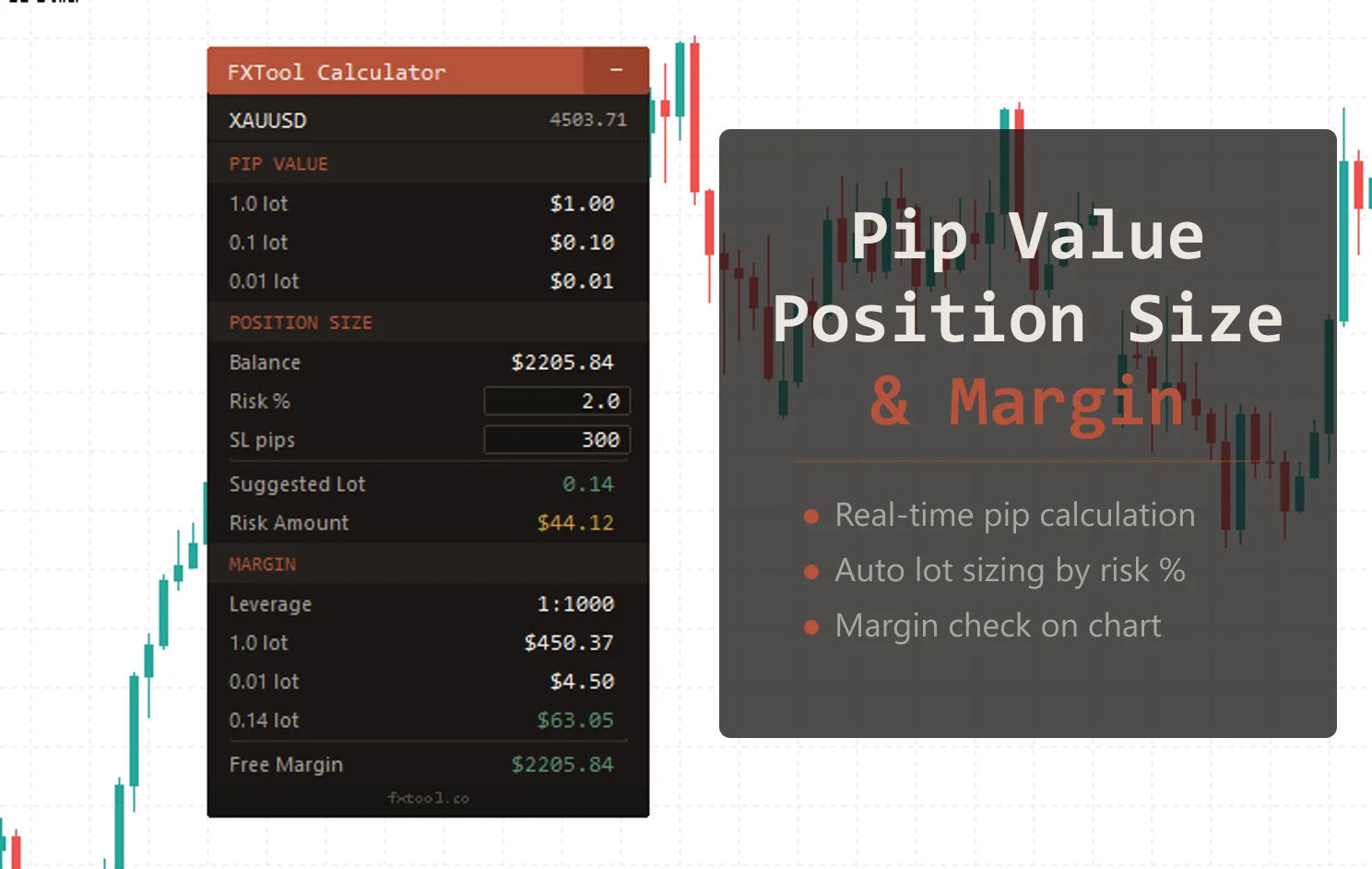
The honest gap: we're a newer site. We don't have the decade-plus track record of Myfxbook or Babypips. You may not have heard of us before.
Best for: Traders who need a bilingual interface, MT5 users who want position sizing on-chart, or anyone who's tired of ads. If you're already using the pip calculator and margin calculator, having them all in one suite beats juggling three websites.
5. Myfxbook Position Size Calculator
Myfxbook started as an account tracking and community platform, and the position size calculator is one of their supporting tools. Live rates, results split into standard/mini/micro lots.
The biggest advantage is ecosystem integration—if you already use Myfxbook for tracking your trading performance, the calculator lives in the same place. No need to open another site. Covers 70+ instruments including forex pairs and metals. Has a Chinese UI.
Downsides: the interface is dated, ads are moderate. The calculator section isn't easy to find from the main navigation—new users may need to dig. According to the BIS 2025 Triennial Survey, daily forex turnover is approximately $9.5 trillion, and Myfxbook serves a significant slice of retail participants—their rate data is reliable.
Best for: Traders who already use Myfxbook for account tracking and want their tools on the same platform.
Comparison Table
| Tool | Rate Data | Instruments | Gold Support | Chinese UI | Ads | MT4/MT5 Version |
|---|---|---|---|---|---|---|
| Babypips | Static | ~28 | No | No | Minimal | No |
| Dukascopy | Market data | Multi-asset | Yes | Yes (partial) | None | No |
| EarnForex | Market data | 60+ forex | Web: no, MT EA: yes | No | Moderate | Yes (MT4/MT5 EA) |
| FXTool | Daily API | 32 (MT5 panel: unlimited) | Yes | Yes | None | Yes (MT5 panel) |
| Myfxbook | Market data | 70+ | Yes | Yes | Moderate | No |
How to Choose
Don't overthink this. They all get the math right. The question is which one fits how you actually trade.
Just starting out → Babypips. Education and tools in one place. You don't need features right now—you need to understand why you're calculating in the first place.
Trade exotic pairs → EarnForex is basically your only option. USD/TRY, EUR/ZAR—other calculators don't cover them. The MT4/MT5 indicator version is a real time-saver if you're sizing positions ten or more times a day.
Need a Chinese interface → FXTool. Bilingual position size calculators barely exist. The web version covers 32 instruments, but if you use the MT5 panel, instrument limits disappear—it reads pip values and rates directly from your broker in real time, so it can calculate any instrument your broker offers. The 7-tool web suite is interlinked: size your position, then jump to risk-reward or margin in one click.
Already on Myfxbook → Stay there. If you're tracking your account performance on Myfxbook, having the calculator in the same ecosystem saves a tab.
Care about data source quality → Dukascopy. Swiss bank-grade rates, clean interface, no ads.
3 Position Sizing Mistakes That Blow Accounts
1. Using a fixed lot size instead of calculating based on risk
"I always trade 0.1 lots." We hear this constantly when helping users configure EA parameters.
Here's the problem: 0.1 lots on EUR/USD with a 30-pip stop loses $30. The same 0.1 lots on GBP/JPY with an 80-pip stop loses $50+ (depending on the USD/JPY rate). Same "0.1 lots," nearly double the actual risk. And on gold, 0.1 lots moves on a completely different scale than forex.
Decide the dollar amount you're willing to lose first (say 1-2% of your account), then calculate the lot size. That's the whole point of a position size calculator—it doesn't help you make more money, it helps you lose less.
2. Forgetting to convert account currency
Your account is in EUR. You're trading USD/CAD. The pip value needs to be converted from CAD to EUR—there's an extra exchange rate step in the middle. Easy to skip when doing it by hand, or easy to use yesterday's rate by accident.
Calculators with live rates handle this automatically. That's the real value of the conversion feature—not convenience, accuracy.
3. Getting gold contract size wrong
We've hit this more than once when testing gold EAs: a user sends backtest settings where the position size is off by 10x because they assumed 1 lot of gold = 100,000 units (like forex). It's 100 troy ounces. Some brokers use 10 ounces for a mini lot, others use 50.
Add in the pip definition inconsistency ($0.01 vs $0.1), and you can be off by a factor of 10. Every time you switch brokers or trade gold for the first time, check the contract specifications.
FAQ
How do you calculate forex position size?
Formula: Lot Size = Risk Amount ÷ (Stop Loss Pips × Pip Value per Lot). Example: $10,000 account, 2% risk ($200), EUR/USD, 50-pip stop ($10/pip per lot). Lot size = 200 ÷ 500 = 0.40 standard lots.
What position size should I use with a $1,000 account?
Depends on your risk tolerance and stop distance. At 2% risk, your maximum loss per trade is $20. For EUR/USD with a 50-pip stop, that's about 0.04 lots (4 micro lots). Realistically, $1,000 accounts should stay in the 0.01-0.05 lot range.
How do you calculate position size for gold?
First, confirm your broker's contract size (usually 1 lot = 100 troy ounces) and pip definition ($0.01 or $0.1). Then apply the standard formula. Gold's volatility means the calculated lot size is typically much smaller than forex at the same risk percentage—that's normal and correct.
What does 0.01 lots mean?
0.01 lots (1 micro lot) = 1,000 units of the base currency. On EUR/USD, 1 pip moves about $0.10. A 50-pip stop loss costs roughly $5. It's the smallest standard trading unit—ideal for small accounts.
How much risk per trade is safe?
Professional traders typically risk 1-2% per trade. Beginners should start at 1% or even 0.5%. Sounds conservative. But at 1%, you can be wrong 20 trades in a row and still have capital to keep going. Traders who use higher percentages usually don't survive their first year. For a deeper look at risk control strategies, see the risk management guide.
Is position size the same as lot size?
Essentially yes. "Position size" is the general term; "lot size" is the forex-specific unit. 1 standard lot = 100,000 units, 1 mini lot = 10,000 units, 1 micro lot = 1,000 units. A position size calculator tells you how many lots to trade.
This article reviews position sizing tools and does not constitute investment advice. Trading involves significant risk. Position sizing is the first step of risk management—not the entirety of it.
About the author: The FXTool team builds and tests MetaTrader trading tools daily. We run every EA we sell on live accounts and publish the results. Browse our full product catalog to see what we've built. This guide reflects what we've learned from building 50+ EAs and working with thousands of retail traders.