Before you place a trade, do you know exactly how much each pip is worth?
A lot of traders think they do—until they switch pairs or change lot sizes. EUR/USD at 1 standard lot is clean: $10 per pip, easy to remember. But try USD/JPY at 157.30, or gold where your broker may define a pip as 0.01, 0.1, or 1.0 depending on their platform settings. The mental math gets unreliable fast. Get it wrong, and the stop loss that looks reasonable is actually exposing you to twice the risk you intended.
We tested every free pip value calculator we could find in May 2026 and narrowed it down to 6 worth using. They all got the basic EUR/USD calculation right. Where they diverge is coverage, live rates, UX, and whether they're actually trying to help you trade or just trying to get you to open an account.
What Is a Pip? (Quick Version)
A pip is the smallest standard unit of price movement in forex—"percentage in point." For most pairs quoted to 4 decimal places, the 4th decimal is 1 pip. EUR/USD moving from 1.0800 to 1.0801 is 1 pip.
Three things that regularly trip traders up:
JPY pairs use a different pip size. The standard pip is the 2nd decimal place. USD/JPY moving from 157.00 to 157.01 is 1 pip. Your broker quotes to the 3rd decimal (e.g. 157.012), but that 3rd digit is a pipette—not a pip.
Pip vs. point vs. pipette. Not interchangeable. With 5-decimal pricing (3 for JPY pairs), the 5th digit is a pipette. 1 pip = 10 points. MT5 displays price changes in points internally—a common source of confusion when you're reading your own trade history.
Gold is genuinely inconsistent across brokers. XAU/USD pip definitions vary: some define 1 pip as 0.01, others as 0.1 (and in rare configurations, 1.0). Before running any calculation for gold, verify your broker's definition. The difference between 0.01 and 0.1 is a 10x error in your pip value—which means your position size is 10x off. Not a rounding issue.
Once you have the pip value, the next step is plugging it into your position size calculator to get the lot size that keeps your risk under control.
The Pip Value Formula
The core formula works for every pair:
Pip Value = Pip Size × Contract Size × Lot Size
If the quote currency isn't your account currency, you convert the result. Three examples to make it concrete:
EUR/USD
Rate: 1.0800, 1 standard lot (100,000 units):
- Pip size = 0.0001
- Pip value = 0.0001 × 100,000 × 1 = $10
- 0.1 lots: $1 | 0.01 lots: $0.10
EUR/USD is the easy case because the quote currency is already USD.
USD/JPY
Rate: 157.00, 1 standard lot:
- Pip size = 0.01
- Pip value in JPY = 0.01 × 100,000 = 1,000 JPY
- Converted to USD = 1,000 ÷ 157.00 = ~$6.37
The pip value moves with the rate. When USD/JPY rises, each pip is worth less in USD terms. At 150.00 it's $6.67; at 165.00 it's $6.06.
XAU/USD (Gold)
Contract size is different: 1 standard lot = 100 troy ounces.
If 1 pip = 0.01: 0.01 × 100 × 1 = $1 per pip If 1 pip = 0.1 (some brokers): 0.1 × 100 × 1 = $10 per pip
Same trade, same position, 10x difference in outcome. This is why verifying your broker's gold pip definition isn't optional—it's the calculation.
6 Free Pip Calculators: Tested and Compared
We ran the same test on all six in May 2026: EUR/USD, 1 standard lot, USD account. Expected result: $10.00. All six passed. The differences show up everywhere else.
Listed alphabetically—not ranked.
1. Babypips Pip Value Calculator
Babypips is where many traders learn the basics, and the pip calculator is built around that same learner-first mindset.
Pick a pair, enter lot size, select account currency, get result. The explanation of what pips are sits right next to the tool, which is genuinely useful if you're still solidifying the fundamentals. No account needed, no distractions.
Tradeoff: no live exchange rates, so results use static prices that may be slightly off from current market conditions. Pair coverage is limited to majors—no gold, no indices, no crypto. The interface shows its age.
Best for: Traders who are still learning the vocabulary and want education alongside the calculation.
2. FOREX.com Pip Calculator
FOREX.com is one of the larger retail broker platforms (owned by StoneX Group since 2020). Their tool pulls live exchange rates, which is the main differentiator at this end of the list—you don't have to look up the current price separately. It also shows margin requirements alongside pip values. Two numbers on one page, both relevant before you click "buy."
The tool is clearly designed to funnel you toward opening an account. That's fine—just know that's what it's doing. Non-clients can still use it without logging in. Crypto support depends on your region.
Best for: FOREX.com clients who want everything in one place, or anyone who wants live-rate accuracy without fuss.
3. FXTool Pip Calculator
Full disclosure: this is our own tool. Here's an honest take.
FXTool Pip Calculator covers around 50 instruments—major pairs, crosses, XAU/USD, and BTC/USD. We built it because when we were testing our own EAs, we got tired of bouncing between three separate browser tabs to check pip value, position size, and margin before sizing a trade. Having them split across different sites is fine occasionally; annoying when you're doing it 20 times a day.
The bilingual interface (English and Chinese) was a specific request from our user base—a lot of traders working in Asian markets use both languages depending on who they're talking to. It's one of the few calculators that actually handles this.
What it doesn't have: exotic pair coverage (USD/TRY, EUR/ZAR, etc.) and the brand recognition of tools that have been around for a decade. We're newer. The calculation engine is solid, but we can't point to years of community trust the way Myfxbook or Babypips can.
The tool is part of a suite of 7 calculators—pip value, position size, profit/loss, margin, risk-reward, compound interest, and drawdown—all linked from the same page. No ads, no registration.
If you trade on MT5, there's also a chart panel that puts pip value, position size, and margin in one overlay directly on your chart. Enter your risk percentage and stop loss distance; it calculates lot size and required margin without leaving the platform. Free to download — just register for an account. We built this after noticing that most traders who used the web calculator were copying numbers into MT5 by hand, which is where input errors happen.
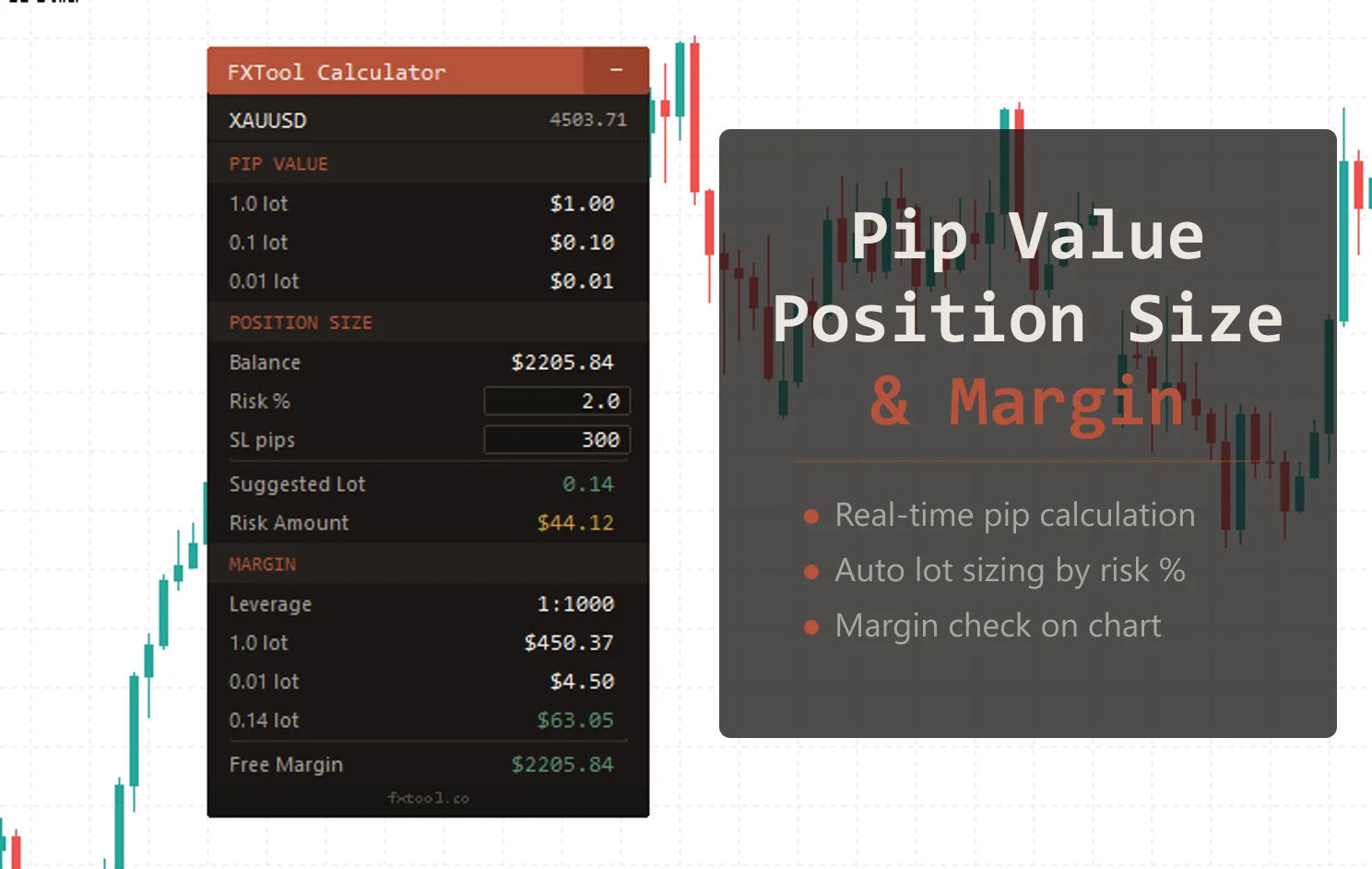
Best for: Traders who want a clean ad-free experience, need a bilingual interface, or trade on MT5 and want everything in one chart panel.
4. Investing.com Pip Calculator
Investing.com wins on coverage—it's not close. USD/TRY, EUR/ZAR, SGD/HKD, obscure crosses—if you trade it, the pair is probably there. Live rates, results displayed for standard, mini, and micro lots simultaneously. That's a lot of useful information on one screen.
The cost of all that information: the page is loaded with ads. Banners, pop-ups, sidebar promotions—sometimes they're more prominent than the calculator. Page load is noticeably slower than the dedicated tool sites. On mobile it's a real slog to find the actual input fields among the surrounding content.
If you only trade majors, this is overkill. If you regularly trade exotics, it's the most complete free option available.
Best for: Traders who work with exotic or less common pairs and need broad coverage more than they need a clean interface.
5. Myfxbook Pip Calculator
Myfxbook has a dedicated user base—it's been a community platform for forex traders for years, and the calculator suite benefits from that longevity. Live rates, results broken down by lot size, each pair on its own URL which makes bookmarking simple.
The UX is outdated. Not broken—just clearly not a priority compared to the account tracking features the site is known for. Ads are present. The calculator section isn't prominently linked from the main navigation, so new users sometimes hunt for it. Forex is a $7.5 trillion-per-day market and Myfxbook serves a meaningful slice of retail participants—their rates reflect real market conditions.
Best for: Traders who already use Myfxbook for tracking their accounts and want their calculator in the same ecosystem.
6. FXTM Pip Calculator
FXTM is an international broker with a standalone calculator that does exactly what it says and nothing more.
Pair, lot size, account currency—result. Supported instruments include forex pairs, precious metals, and some indices. Fast load time, minimal page clutter. No login required. Account-opening prompts are on the page but not aggressive. No Chinese interface.
It's not trying to be a feature platform. It's trying to give you a number quickly. For that specific use case, it does well.
Best for: Anyone who wants a fast, clean result with no distractions and doesn't need Chinese language support.
Comparison Table
| Tool | Live Rates | Instruments | Chinese UI | Ads | Mobile UX |
|---|---|---|---|---|---|
| Babypips | No | ~30 | No | Minimal | Average |
| FOREX.com | Yes | ~50 | No | Minimal | Good |
| FXTool | Yes | ~50 | Yes | None | Good |
| Investing.com | Yes | 100+ | Yes | Heavy | Poor |
| Myfxbook | Yes | ~60 | No | Moderate | Average |
| FXTM | Yes | ~50 | No | Minimal | Good |
Which One to Pick
The honest answer: don't overthink it. Use the one that fits your situation.
Still learning the basics → Babypips. The educational context next to the tool is actually useful when you're still solidifying the concepts.
Trade exotic pairs → Investing.com. Nothing else comes close on coverage. The ads are the price.
Need a Chinese interface → FXTool. Very few bilingual options exist. It's also the only one with a full 7-calculator suite linked together.
Want fast with no friction → FXTM. Minimal page, quick results.
Already use Myfxbook for account tracking → Myfxbook. Keep your tools in one place.
Trade on MT5 actively → FXTool's MT5 panel. Web calculators work fine for occasional use; for 10+ trades a day, having it on the chart saves real time and eliminates copy-paste errors.
If you only check pip values once in a while, all six work fine for that. The choice matters more when you're using these frequently or need specific features around language, coverage, or platform integration.
3 Pip Value Mistakes That Cost People Money
Getting the JPY pip size wrong
For JPY pairs, 1 pip = 0.01, not 0.0001. If you use the wrong pip size in a manual calculation or spreadsheet, your result is off by a factor of 100. All six calculators handle this automatically, but if you're building your own risk model in Excel, you need the conditional. We've seen this mistake in EA backtests where the developer hardcoded 0.0001 as the pip size for all pairs.
Confusing pips and points—especially for gold
In MT5, a "point" is the smallest price increment. For 5-decimal pairs, 1 pip = 10 points. For gold it gets messier because brokers don't agree on the pip definition. When your MT5 EA reports a trade closed "100 points" up, that could be 10 pips or 100 pips depending on how the instrument is configured. Getting this wrong throws off your position sizing and risk management calculations in ways that aren't immediately obvious. See also: EA backtesting guide for how to verify instrument settings before running automated strategies.
Entering the wrong lot size unit
0.1 standard lots = 1 mini lot = 10,000 units. 0.01 standard lots = 1 micro lot = 1,000 units. Some calculators ask for "standard lots," others let you pick standard/mini/micro from a dropdown. If you want 1 mini lot but type "1" into a standard lot field, your result is 10x too high. Check which unit the calculator expects before you trust the output.
FAQ
How much is 1 pip worth?
Depends on the pair, lot size, and account currency. EUR/USD is the easy reference: 1 standard lot = ~$10 per pip; 0.1 lots = ~$1; 0.01 lots = ~$0.10. For other pairs, the result depends on the current exchange rate and contract size.
How much is 1 pip worth for gold (XAU/USD)?
If your broker defines 1 pip as 0.01, then 1 standard lot (100 oz) = $1 per pip. If they define it as 0.1, same trade = $10 per pip. That's the most common source of gold calculation errors—always check your broker's instrument spec before trusting any calculator result for metals.
How do you calculate USD/JPY pip value?
Formula: 0.01 × 100,000 × lots ÷ current rate. At USD/JPY = 157.00, 1 standard lot = 1,000 ÷ 157 = ~$6.37 per pip. As the rate rises, the per-pip value in USD falls.
Why do different calculators show different pip values?
Two reasons: different live quotes from different liquidity providers (usually a tiny difference), and different pip definitions for certain instruments like gold. If you see a big discrepancy between two calculators for a forex pair, one of them is using a stale exchange rate. For gold, check the pip definition.
What's the difference between a pip and a point?
A pip is the standard unit of price movement (4th decimal for most pairs, 2nd for JPY). A point is the smallest increment in 5-decimal pricing—1 pip = 10 points. MT5 uses points internally; most trading conversations use pips. The conversion is fixed, but mixing them up in position sizing calculations causes real errors.
Getting pip values right is not the interesting part of trading—it's the foundation that makes everything else valid. If the pip value is wrong, your position size is wrong, your stop distance is wrong, and your risk percentage is wrong. The whole pre-trade calculation depends on getting this first step right.
Pick a calculator that matches how you actually trade, and use it every time. The habit matters more than the tool.
Forex trading involves significant risk. This article is for informational purposes only and does not constitute investment advice.
Try the FXTool Pip Calculator if you want no ads and a clean experience. If you're on MT5 and want to stop tab-switching, the Trade Calculator Panel has pip value, position size, and margin on your chart—free to download.
Other calculators in the suite:
- Position Size Calculator — Lot size based on your risk percentage and stop distance
- Profit Calculator — Estimate P&L before entering
- Margin Calculator — Check if your balance covers the trade
- Risk-Reward Calculator — Evaluate whether the setup makes sense before risking capital
About the author: The FXTool Research Team develops and tests MetaTrader trading tools for active forex traders. We've built and reviewed 50+ EAs, run live account testing on every product we publish, and built 7 trading calculators from scratch—which means we've had to understand pip value, position sizing, and margin mechanics well enough to implement them correctly across 50+ instruments. This article is based on that direct experience, plus our May 2026 hands-on testing of the calculators listed here. Questions or corrections: contact us.